Flip Master
- 4.6
- Rating
- 50.00M
- Installs
- Free
- Price
 Analysis by App-foxy
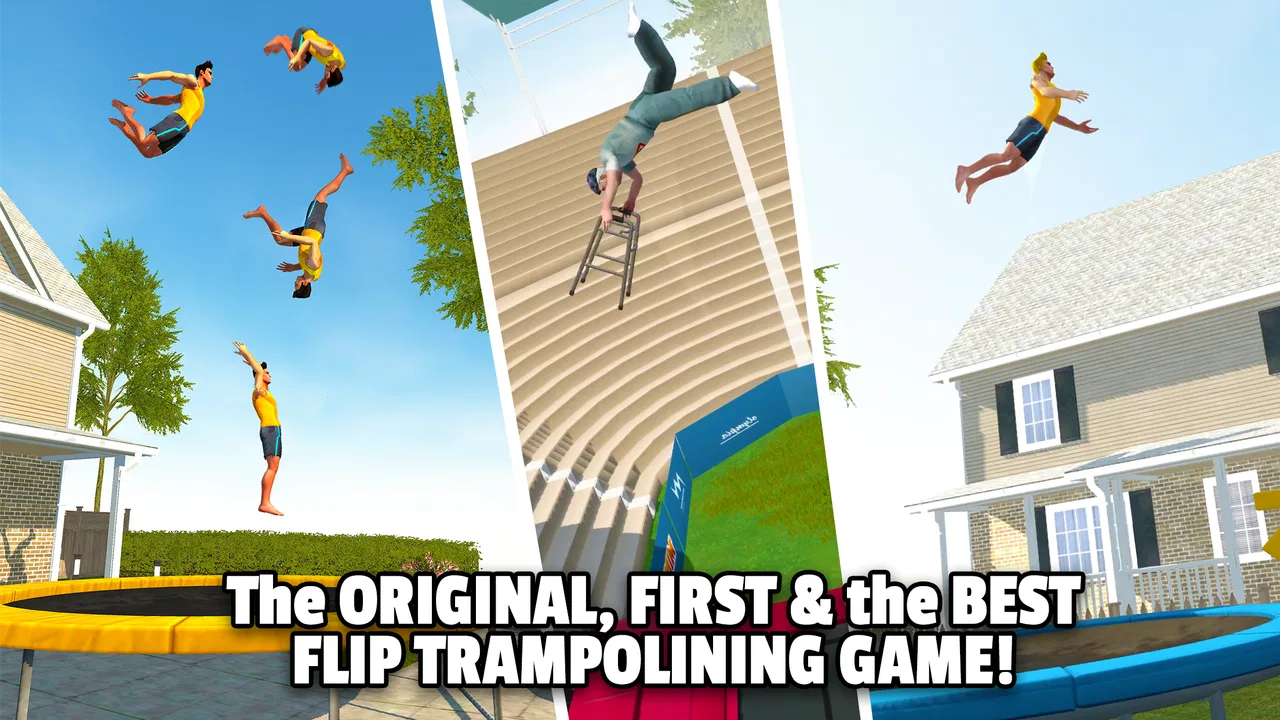
I picked up Flip Master expecting a quick sports game for spare minutes, and that is exactly where it works best. It turns trampoline movement into a series of short attempts: launch, rotate, land, and try to improve the next jump. The idea is easy to understand, but the timing gives it enough tension to keep me coming back after a failed landing. I would describe it as a casual sports game with an arcade feel rather than a realistic training tool.
That distinction matters. I am not using it to learn real trampoline technique, and I would not treat the on-screen tricks as instructions for physical activity. I play it while waiting for an appointment, during a short break, or when someone else in the house wants to take a turn. Its free entry point makes sharing it casually simple, although the Teen content rating is worth keeping in mind when deciding whether it belongs on a child’s device.
How the game feels when several people share one device
The most enjoyable household use I found was passing the phone around after each attempt. One person tries to land a clean flip, another immediately wants to beat that result, and the game creates a small competition without requiring a long session. That makes it more suitable for a kitchen table or a short family wait than for a planned multiplayer evening. The appeal comes from watching the next jump unfold, not from building a complicated shared profile.
You May Also Like

 Google Keep - Notes and lists
Google Keep’s Quiet Growth Shows the Appeal of Simpler Notes
As mobile work gets busier, Google Keep keeps winning a simple contest: capture a thought quickly, find it later, and get on with the day.

 Blood Strike: 2.5 Anniversary
Blood Strike’s Loadouts Turn Every Drop Into a Tactical Gamble
A close look at Blood Strike’s custom loadouts: how fast access to signature weapons reshapes its battle royale rhythm, rewards preparation, and narrows the gap between fights.

 Pandora - Music & Podcasts
Pandora’s Music Is Easy to Start, but Harder to Recover
Pandora’s strength is its low-effort path from a seed to a station. Its weak spot is how much confidence it asks you to place in connection, setup, and quiet recovery.

 8 Ball Pool
 Is Built on Rivalries, Rematches, and Routine
A close look at the rivalries, rematches, shared routines, and unanswered safety questions that turn a quick pool match into a persistent mobile community.

 Samsung Music
’s Quiet Strength Is Playing What You Already Own
Its reach comes less from spectacle than from dependable access to a personal library. That simplicity is both the app’s strongest retention engine and its ceiling.

 AccuWeather: Weather Radar
AccuWeather Review: A Quick, Clear Forecast for Everyday Decisions
For everyday plans, the best forecast is the one you can understand quickly. AccuWeather makes rain timing, radar, and local conditions easy to act on, with a few trade-offs.
More From Our News Desk



There is also a useful difference between playing alone and playing in a group. Alone, I focus on learning the rhythm of takeoff and landing. With other people watching, I tend to attempt riskier combinations because a spectacular failure is still entertaining. That can make the game feel more exciting, but it can also encourage impatient play. If the device is being shared, I recommend agreeing beforehand that each person gets a fixed number of attempts rather than letting the most persistent player keep it.
The short-attempt structure helps with coordination. Nobody needs to remember a long campaign state before handing over the phone, and a new player can understand the basic objective by watching one turn. Still, the game is not equally comfortable for every group. A younger player who is still learning touch timing may need several unsuccessful attempts before the controls feel predictable, while an experienced player can make the same session look effortless. I would keep the mood light and avoid turning a simple stunt game into a serious contest.
What I had to learn about the controls
The central challenge is not choosing a complicated command from a menu. It is managing the moment of rotation and then preparing for the landing. Small timing errors become obvious quickly: a trick can look promising in the air and still end with an awkward crash. I found that watching the character’s position, rather than tapping frantically, produced better results. The game rewards patience more than constant input.
My practical tip is to spend the first few attempts observing the full movement instead of immediately chasing the most impressive stunt. Once I understood how much time I had between launch and landing, I could make more deliberate decisions. This is one of the less obvious strengths of the game: it gives the impression of a simple reflex title, but improvement comes from recognizing a repeatable rhythm.
Another useful habit is to separate experimentation from score chasing. When I tried a new flip while also demanding a perfect result, I usually became tense and mistimed the landing. When I treated a few attempts as practice, I learned more quickly. That approach is especially helpful on a shared device, because it gives less experienced players room to understand the interaction without feeling that they are ruining someone else’s run.
Setting boundaries before handing over the phone
Because the game is free to download, it is easy to install and start without a purchase decision at the beginning. The commercial boundary appears later: in-app purchases range from $0.99 to $19.99 per item. I would explain that clearly before letting a child or guest play on a device connected to a payment method. A free download is not the same thing as a completely cost-free experience.
I would also decide who owns the progress before a shared session begins. If several people use one phone, a single run can become a point of disagreement when one player improves the current result or spends something that another person expected to keep. The safest arrangement is simple: one person plays while another watches, and nobody makes purchase-related decisions without the device owner’s permission.
This is not a criticism of the core game; it is a practical issue with shared devices. The game’s quick, tempting attempts make “just one more try” feel natural, and that can blur the line between a casual turn and a longer session. I found it useful to set a timer or a turn limit, especially when the game was being used to occupy a few people during a short wait.
For a personal phone, I would begin by playing without spending anything. The basic loop is strong enough to judge on its own, and I would only consider an optional purchase after deciding that I genuinely wanted to keep using the game. For a household tablet, I would be more cautious, because several people may assume that anything available on the shared screen is automatically available to them.
Coordinating turns without making the game feel like homework
A good rotation keeps the energy high. I prefer a few attempts per person, followed by a quick comparison of the best landing rather than a long uninterrupted session. This also exposes a useful truth about the game: spectacular tricks are entertaining to watch, but consistent landings are what make someone look skilled over time.
One person can act as the observer and point out whether the timing was early or late, but I would avoid back-seat coaching every second. The player needs to develop a feel for the movement. In my experience, one clear suggestion after a failed attempt is more useful than a stream of instructions while the character is airborne.
There is a small social advantage to the game’s immediate feedback. A failed attempt is easy to understand, so nobody needs to debate complicated rules. At the same time, the outcome can feel harsh when a nearly successful trick ends badly. If a younger or less experienced player is becoming frustrated, switching from score competition to a simple challenge—such as trying one controlled movement—makes the session more welcoming.
I would not choose this as a substitute for a deep sports simulation. Compared with games built around full matches, team management, or realistic athletic strategy, it is much narrower. There is no need to learn a sport’s complete rulebook, but there is also less variety in the kind of decision-making. Its advantage is immediacy: a person can understand the premise in moments and still have room to improve timing.
Age context and trust on a household device
The Teen rating should be part of the conversation before installation. A rating is not a personal recommendation for every teenager, and it certainly does not remove the need for an adult to decide whether the game fits a particular child. I would look at the game together with the intended player, explain the purchase boundary, and make sure everyone understands that the stunts are fictional game actions rather than safe instructions for jumping on a real trampoline.
That last point is particularly important here because the presentation is built around flips and trick movement. Someone watching the screen may connect the virtual action with physical activity, especially if they are young. I would keep the distinction explicit: the game is for tapping and timing on a device, while real trampoline use requires proper equipment, supervision, and instruction. The app should not be used as a guide to copy what appears on screen.
Trust also includes being honest about how the game can affect attention. Its repeated attempts are easy to start and stop, but the desire to improve a landing can stretch a short break into a much longer session. In a shared household, I would agree on when the device needs to be returned, particularly if it is also used for school, work, navigation, or communication.
The game comes from MotionVolt Games Ltd and has been available since August 29, 2017. Its longevity and broad audience are reassuring signs that the basic concept has staying power, but they do not change the need for personal judgement about age, spending, and screen time. I would treat the rating and the purchase range as practical setup information, not as reasons to reject the game automatically.
Performance, access, and the everyday fit
The current version is 3.6.00, and the minimum operating system is Android 6.0. That makes it approachable for people using older Android hardware, although the experience will still depend on the particular phone or tablet. I would install it on the device where touch response feels dependable, because timing-based play becomes frustrating when input feels delayed or inconsistent.
The game is free, which makes trying it straightforward. It has an average rating of 4.6 from around 296 thousand ratings, and it has passed 50 million installs. Those figures suggest that the concept has reached a large audience, but I would not use popularity alone to decide whether it suits a household. The important question is whether the people sharing the device enjoy repeated timing challenges and can agree on sensible boundaries.
For an everyday scenario, imagine two siblings waiting before an appointment with one phone between them. I would give each person three attempts, let them choose whether to repeat a safer movement or try something more ambitious, and stop once the appointment begins. That works because the game does not demand a long uninterrupted story. If the same children need a calm activity with reading, puzzles, or slower problem-solving, I would choose something else.
Battery, notifications, and interruptions can matter more in real use than they do in a store description. I prefer to begin a session when I can finish a few attempts without constantly switching apps. The game is forgiving of short pauses in the sense that its basic appeal does not depend on remembering a complex narrative, but an interrupted turn can still spoil a carefully timed landing.
Where it stands beside other sports games
Most sports games ask me to manage a match, control a team, or reproduce a recognizable athletic discipline. This one reduces the idea to a single performer and a compact stunt loop. That makes it less demanding to learn than a football, basketball, or racing game, but also less satisfying for anyone looking for strategic depth, realistic competition, or a complete season structure.
Against other casual reflex games, its strongest feature is the sense of physical momentum. The character’s movement gives each attempt a beginning, middle, and landing, so I can understand why a mistake happened. It is more expressive than a simple tap-to-score game, yet it remains easier to pick up than a simulation with many controls.
The trade-off is repetition. If the pleasure for you comes from discovering new rules, managing a large roster, or exploring a changing world, the trampoline focus may wear thin. I would recommend it to someone who enjoys practicing a small skill and seeing gradual improvement. I would skip it for a player who needs a strong narrative, meaningful team coordination, or a realistic representation of sport.
It is also not the best choice for a group that wants simultaneous interaction. Passing one device around can be fun, but that is different from everyone controlling a character at the same time. The household experience depends on turn-taking and observation, so the game works better for a compact social moment than for a large gathering where several people expect constant participation.
The small techniques that made my sessions better
My first concrete adjustment was to stop treating every jump as a chance to show off. A controlled attempt teaches me more than a rushed sequence of taps. I watched the arc, waited for the right moment, and used each miss to identify whether my timing was too early or too late. That turned the game from random trial and error into a modest practice routine.
Second, I separated personal improvement from household competition. When I played alone, I focused on repeating a movement consistently. When friends or relatives watched, I allowed more experimentation. Keeping those goals separate reduced frustration and made it easier for a new player to enjoy the game without comparing their first attempts with someone else’s polished run.
Third, I treated purchases and progress as separate conversations. A better result does not automatically justify spending money, and a shared device should never make that decision silently. I would play the free portion first, understand what keeps me interested, and only then decide whether an optional item is worthwhile. This is especially important when the device belongs to a household rather than one individual.
Finally, I used the game as a short social activity rather than an all-evening default. Its design makes repeated attempts appealing, but that does not mean every spare moment needs to become another session. A clear stopping point protects the game’s best quality: it remains a light, satisfying break instead of becoming a source of arguments over time or turns.
Who should install it, and who should pass
I think Flip Master is a good fit for players who enjoy arcade sports, quick retries, and the satisfaction of improving a physical-looking movement through touch timing. It is particularly easy to share informally because someone can understand the objective by watching another person play. Teenagers and adults who like compact challenges will probably get the most from it, provided they are comfortable with the repeated stunt format and the optional purchase structure.
I would be more hesitant for a young child who may interpret the virtual tricks as real-world guidance, or for anyone who becomes upset by repeated failed landings. I would also steer serious sports fans toward a fuller simulation if they want tactics, teams, realistic rules, or a broader competitive structure. This game deliberately chooses one playful slice of sports rather than trying to represent an entire discipline.
People who dislike in-app purchase prompts should approach it with a clear spending boundary from the start. The free price is useful for testing the experience, but the listed purchase range means a shared device deserves extra attention. That is not a reason to avoid the game outright; it is a reason to make the account owner’s expectations clear before anybody begins playing.
My household verdict
After spending time with it, I see this as a lively, focused sports game that earns its place through immediate feedback rather than depth. I like that a single attempt can be entertaining, while repeated play gives timing and consistency room to develop. I also like how naturally it fits a short shared-device session, as long as turns, spending, and stopping times are agreed in advance.
Its limitations are just as clear. The core idea can become repetitive, the game is not a substitute for real trampoline instruction, and it does not offer the kind of team or match structure found in broader sports titles. The Teen rating and optional purchases mean I would not install it thoughtlessly on a child’s or family device.
My recommendation is positive but specific: try it if you want quick trampoline stunt action and enjoy refining a small touch-based skill. Start free, play with sensible turn limits, and keep the virtual stunts separate from real physical activity. For a household looking for a simple game that people can watch, attempt, and hand over without learning a complicated rule system, it is a worthwhile choice. For anyone seeking realism, deep strategy, or a calm activity with little repetition, another category of game will serve you better.
FAQs for Flip Master
01What is Flip Master, and what is its main objective?
Flip Master is a dynamic trampoline game available for Android and iOS devices. The main objective is to perform various trampoline tricks and flips to score points and advance through levels. Players can unlock new characters and trampolines, enhancing their gameplay experience with different skills and environments.
02Are there any in-app purchases in Flip Master?
Yes, Flip Master offers in-app purchases. Players can buy coins and special items to enhance their characters and gameplay. While you can enjoy the game for free, purchasing items can help you progress faster or unlock exclusive features, providing a more customized gaming experience.
03What devices are compatible with Flip Master?
Flip Master is compatible with both Android and iOS devices. Ensure your device runs on a recent version of the operating system to avoid performance issues. The game is optimized for smooth performance, but older devices might experience lag or reduced graphics quality.
04Does Flip Master require an internet connection to play?
No, Flip Master can be played offline. However, an internet connection is necessary for certain features like accessing leaderboards, updates, and in-app purchases. Playing offline allows you to enjoy the core game features without interruptions, making it convenient for travel or areas with limited connectivity.
05Is Flip Master suitable for children?
Flip Master is designed to be family-friendly, with colorful graphics and straightforward gameplay. However, it does include in-app purchases, so parental supervision is recommended to avoid unintended transactions. The game’s content is generally appropriate for children, making it a fun option for younger players.
Pros
- Smooth and responsive controls.
- Wide variety of trampolines and tricks.
- Realistic physics for more engaging gameplay.
- Visually appealing graphics.
- Regular updates with new content.
Cons
- Can become repetitive over time.
- In-app purchases can be pricey.
- Requires an internet connection.
- Occasional ads may disrupt gameplay.
- Limited character customization options.

Flip Master
Gallery